# 批量发送消息
给多个用户或者多个部门中的成员发送消息。
## 前提条件
- 应用需要启用[机器人能力](https://open.feishu.cn/document/uAjLw4CM/ugTN1YjL4UTN24CO1UjN/trouble-shooting/how-to-enable-bot-ability)。
- 批量发送消息时,指定的部门或用户需要在机器人的[可用范围](https://open.feishu.cn/document/home/introduction-to-scope-and-authorization/availability)内。
## 使用限制
- 该接口仅支持向用户发送消息,无法向群组发送消息。
- 通过该接口发送的消息,具备独立的消息 ID(以 `bm-` 为前缀),该类消息不支持编辑、回复等操作,仅支持[批量撤回消息](https://open.feishu.cn/document/uAjLw4CM/ukTMukTMukTM/reference/im-v1/batch_message/delete)、[查询批量消息推送和阅读人数](https://open.feishu.cn/document/uAjLw4CM/ukTMukTMukTM/reference/im-v1/batch_message/read_user)、[查询批量消息整体进度](https://open.feishu.cn/document/uAjLw4CM/ukTMukTMukTM/reference/im-v1/batch_message/get_progress)。
- 单个应用每天通过该接口发送的消息总条目数不能超过 50 万条。
- 该接口为异步接口,会有一定延迟。每个应用待发送的消息按顺序处理,请合理安排批量发送的范围和顺序。
如果只需要向单个用户或者群聊发送消息,或者业务要求发送消息不能有延迟,请使用[发送消息](https://open.feishu.cn/document/uAjLw4CM/ukTMukTMukTM/reference/im-v1/message/create)接口。
## 请求
基本 |
---|---
HTTP URL | https://open.feishu.cn/open-apis/message/v4/batch_send/
HTTP Method | POST
接口频率限制 | [1000 次/分钟、50 次/秒](https://open.feishu.cn/document/ukTMukTMukTM/uUzN04SN3QjL1cDN)
支持的应用类型 | Custom App、Store App
权限要求
**调用该 API 所需的权限。**
根据发送目标申请相应可选权限 | 获取与发送单聊、群组消息(im:message)
获取与发送单聊、群组消息(im:message:send_as_bot)
给多个用户批量发消息(im:message:send_multi_users)
给一个或多个部门的成员批量发消息(im:message:send_multi_depts)
**注意事项**:**说明**:
- 必须拥有 **获取与发送单聊、群组消息** 权限或者 **以应用的身份发消息** 权限。
- 至少拥有一个批量发送消息权限:
- 给用户批量发送消息,需要拥有 **给多个用户批量发消息** 权限。
- 给指定部门成员批量发送消息,需要拥有 **给一个或多个部门的成员批量发消息** 权限。
### 请求头
名称 | 类型 | 必填 | 描述
---|---|---|---
Authorization | string | 是 | `tenant_access_token`
租户访问凭证,即以租户(企业或团队)身份调用 API,[自建应用获取 tenant_access_token](https://open.feishu.cn/document/ukTMukTMukTM/ukDNz4SO0MjL5QzM/auth-v3/auth/tenant_access_token_internal)、[商店应用获取 tenant_access_token](https://open.feishu.cn/document/ukTMukTMukTM/ukDNz4SO0MjL5QzM/auth-v3/auth/tenant_access_token)。
**值格式**:"Bearer access_token"
**示例值**:"Bearer t-g1044qeGEDXTB6NDJOGV4JQCYDGHRBARFTGT1234"
Content-Type | string | 是 | **固定值**:"application/json; charset=utf-8"
### 请求体
参数 | 类型 | 必填 | 描述
---|---|---|---
msg_type | string | 是 | 消息类型。支持的消息类型有:
- text:文本
- image:图片
- post:富文本
- share_chat:分享群名片
- interactive:卡片
**注意**:
- 如果 `msg_type` 取值为 text、image、post 或者 share_chat,则消息内容需要传入 `content` 参数内。
- 如果 `msg_type` 取值为 interactive,则消息内容需要传入 `card` 参数内。
- 富文本类型(post)的消息,不支持使用 `md` 标签。
各类型的内容如何配置,参见[发送消息内容](https://open.feishu.cn/document/uAjLw4CM/ukTMukTMukTM/im-v1/message/create_json),但需要确保符合当前接口的要求。例如,仅支持以上 5 种消息类型、批量发送富文本消息时不支持 `md` 标签等。
**示例值**:text
content | object | 否 | 消息内容,JSON 结构。该参数的取值与 `msg_type` 对应,例如 `msg_type` 取值为 `text`,则该参数需要传入文本类型的内容。
**注意:**
- 该参数仅在 `msg_type` 取值为 text、image、post 或者 share_chat 时需要传入值。如果 `msg_type` 取值为 interactive,则消息内容需要传入到 `card` 参数。
- 文本消息请求体最大不能超过 150 KB。
- 富文本消息请求体最大不能超过 30 KB。
- 文本消息(text)仅在该接口中不支持加粗、斜体、下划线、删除线样式。
- 如果消息中包含样式标签,会使实际消息体长度大于您输入的请求体长度。
- 图片需要先[上传图片](https://open.feishu.cn/document/uAjLw4CM/ukTMukTMukTM/reference/im-v1/image/create),然后使用图片的 Key 发消息。
- 该接口直接传入 JSON 结构的消息内容即可,无需进行转义。
了解各类型消息的内容格式、使用限制,可参见[发送消息内容](https://open.feishu.cn/document/uAjLw4CM/ukTMukTMukTM/im-v1/message/create_json)。
**示例值**:{ "text": "要发送的文本消息" }
card | object | 否 | 卡片内容,JSON 结构。
**注意**:
- 该参数的取值与 `msg_type` 对应,仅当 `msg_type` 取值为 interactive 时,需要将卡片内容传入当前参数。当 `msg_type` 取值不为 interactive 时,消息内容需要传入到 `content` 参数。
- 卡片消息请求体最大不能超过 30 KB。
- 如果使用卡片模板(template_id)发送消息,实际大小也包含模板对应的卡片数据大小。
- 该接口直接传入 JSON 结构的消息内容即可,无需进行转义。了解更多参见[发送卡片](https://open.feishu.cn/document/uAjLw4CM/ukzMukzMukzM/feishu-cards/send-feishu-card)。
**示例值**:{"elements":[{"tag":"div","text":{"content":"This is the plain text","tag":"plain_text"}}],"header":{"template":"blue","title":{"content":"This is the title","tag":"plain_text"}}}
department_ids | list | 否 | 部门 ID 列表。列表内支持传入部门 department_id 和 open_department_id,部门 ID 介绍与获取方式,参见[部门资源介绍](https://open.feishu.cn/document/uAjLw4CM/ukTMukTMukTM/reference/contact-v3/department/field-overview)的 **部门 ID** 章节。
**注意**:
- 不支持传入根部门 ID(根部门 ID 为 `0`)。
- 列表长度不能超过 200。
- 请求时,消息会发送给 ID 对应部门内的所有成员,包括部门下的所有子部门成员。
- `department_ids`、`open_ids`、`user_ids`、`union_ids` 四个字段至少需要填写其中一个。
**示例值**:["3dceba33a33226","d502aaa9514059", "od-5b91c9affb665451a16b90b4be367efa"]
open_ids | list | 否 | 用户 open_id 列表。open_id 获取方式参见[如何获取自己的 Open ID](https://open.feishu.cn/document/uAjLw4CM/ugTN1YjL4UTN24CO1UjN/trouble-shooting/how-to-obtain-openid)。
**注意**:
- 列表长度不能超过 200。
- `department_ids`、`open_ids`、`user_ids`、`union_ids` 四个字段至少需要填写其中一个。
**示例值**:["ou_18eac85d35a26f989317ad4f02e8bbbb","ou_461cf042d9eedaa60d445f26dc747d5e"]
user_ids | list | 否 | 用户 user_id 列表。user_id 获取方式参见[如何获取自己的 User ID](https://open.feishu.cn/document/uAjLw4CM/ugTN1YjL4UTN24CO1UjN/trouble-shooting/how-to-obtain-user-id)。
**注意**:
- 列表长度不能超过 200。
- `department_ids`、`open_ids`、`user_ids`、`union_ids` 四个字段至少需要填写其中一个。
**示例值**:["7cdcc7c2","ca51d83b"]
union_ids | list | 否 | 用户 union_id 列表。union_id 获取方式参见[如何获取自己的 Union ID](https://open.feishu.cn/document/uAjLw4CM/ugTN1YjL4UTN24CO1UjN/trouble-shooting/how-to-obtain-union-id)。
**注意**:
- 列表长度不能超过 200。
- `department_ids`、`open_ids`、`user_ids`、`union_ids` 四个字段至少需要填写其中一个。
**示例值**:["on_cad4860e7af114fb4ff6c5d496d1dd76","on_gdcq860e7af114fb4ff6c5d496dabcet"]
### 请求体示例
批量发送消息的内容为 JSON 结构,不需要转义。
#### 文本消息
```json
{
"department_ids": [
"3dceba33a33226",
"d502aaa9514059"
],
"open_ids": [
"ou_18eac85d35a26f989317ad4f02e8bbbb",
"ou_461cf042d9eedaa60d445f26dc747d5e"
],
"user_ids": [
"7cdcc7c2",
"ca51d83b"
],
"union_ids": [
"on_cad4860e7af114fb4ff6c5d496d1dd76",
"on_gdcq860e7af114fb4ff6c5d496dabcet"
],
"msg_type": "text",
"content": {
"text": "test content"
}
}
```
#### 富文本消息
```json
{
"open_ids": [
"ou_a18fe85d22e7633852d8104226e99eac",
"ou_9204a37300b3700d61effaa439f34295"
],
"department_ids": [
"od-5b91c9affb665451a16b90b4be367efa"
],
"msg_type": "post",
"content": {
"post": {
"zh_cn": {
"title": "我是一个标题",
"content": [
[
{
"tag": "text",
"text": "第一行"
},
{
"tag": "a",
"href": "http://www.feishu.cn",
"text": "飞书"
}
]
]
},
"en_us": {
"title": "I am a title",
"content": [
[
{
"tag": "text",
"text": "first line"
},
{
"tag": "a",
"href": "http://www.feishu.cn",
"text": "feishu"
}
]
]
}
}
}
}
```
#### 图片消息
```json
{
"open_ids": [
"ou_a18fe85d22e7633852d8104226e99eac",
"ou_9204a37300b3700d61effaa439f34295"
],
"department_ids": [
"od-5b91c9affb665451a16b90b4be367efa"
],
"msg_type": "image",
"content": {
"image_key": "img_v2_8e5a80ec-4d94-4bb2-84d5-e25d6c28dacj"
}
}
```
#### 群分享消息
```json
{
"open_ids": [
"ou_a18fe85d22e7633852d8104226e99eac",
"ou_9204a37300b3700d61effaa439f34295"
],
"department_ids": [
"od-5b91c9affb665451a16b90b4be367efa"
],
"msg_type": "share_chat",
"content": {
"share_chat_id": "oc_84983ff6516d731e5b5f68d4ea2e1da5"
}
}
```
#### 卡片消息
卡片消息的请求体需使用 `card` 参数,不使用 `content` 字段。
- 使用[卡片 JSON](https://open.feishu.cn/document/uAjLw4CM/ukzMukzMukzM/feishu-cards/card-json-structure) 发送
```json
{
"open_ids": [
"ou_a18fe85d22e7633852d8104226e99eac",
"ou_9204a37300b3700d61effaa439f34295"
],
"department_ids": [
"od-5b91c9affb665451a16b90b4be367efa"
],
"msg_type": "interactive",
"card": {
"config": {
"wide_screen_mode": true
},
"elements": [
{
"tag": "div",
"fields": [
{
"is_short": true,
"text": {
"tag": "lark_md",
"content": "**🗳工单来源:**\n报事报修"
}
},
{
"is_short": true,
"text": {
"tag": "lark_md",
"content": "**📝工单类型:**\n客服工单"
}
}
]
}
],
"header": {
"template": "turquoise",
"title": {
"content": "📚晒挚爱好书,赢读书礼金",
"tag": "plain_text"
}
}
}
}
```
- 使用[卡片模板](https://open.feishu.cn/document/uAjLw4CM/ukzMukzMukzM/feishu-cards/send-feishu-card#718fe26b)发送
```json
{
"open_ids": [
"ou_a18fe85d22e7633852d8104226e99eac",
"ou_9204a37300b3700d61effaa439f34295"
],
"department_ids": [
"od-5b91c9affb665451a16b90b4be367efa"
],
"msg_type": "interactive",
"card": {
"type": "template",
"data": {
"template_id": "ctp_xxxxxx",
"template_variable": {
"var_xxx": "xxxxxx"
}
}
}
}
```
### SDK 调用示例
使用[服务端 SDK](https://open.feishu.cn/document/ukTMukTMukTM/uETO1YjLxkTN24SM5UjN) 时,需要以原生 API 调用方式调用该接口,以 Java SDK 为例,调用接口的示例代码如下所示。
```java
void batchSendMessage() {
JsonArray ids = new JsonArray();
ids.add(openId);
JsonObject content = new JsonObject();
content.addProperty("text", "test content");
JsonObject body = new JsonObject();
body.addProperty("msg_type", MessageTypeEnum.TEXT.getValue());
body.add("open_ids", ids);
body.add("content", content);
RawResponse rawResponse = client.post("/open-apis/message/v4/batch_send/", body, AccessTokenType.Tenant);
BaseResponse baseResponse = UnmarshalRespUtil.unmarshalResp(rawResponse, BaseResponse.class);
baseResponse.setRawResponse(rawResponse);
log.info("success={}, code={}, msg={}", baseResponse.success(), baseResponse.getCode(), baseResponse.getMsg());
}
```
## 响应
### 响应体
参数 |类型| 说明
-- |--| --
code |int| 错误码,非 0 表示失败
msg|string|错误描述
data | - | -
∟message_id |string| 批量消息任务 ID,批量发送消息的任务唯一标识,以 `bm-` 开头(与一般的消息 ID `om_` 不同,注意区分)。
∟invalid_department_ids |list| 不合法的部门 ID 列表。请求时传入的 department_ids 列表内存在部分部门 ID 无效时,会将这部分 ID 通过该参数返回,同时会向正确的部门 ID 批量发送消息。
∟invalid_open_ids |list| 不合法的 open_id 列表。请求时传入的 open_ids 列表内存在部分用户 open_id 无效时,会将这部分 ID 通过该参数返回,同时会向正确的用户 ID 批量发送消息。
∟invalid_user_ids |list| 不合法的 user_id 列表。请求时传入的 user_ids 列表内存在部分用户 user_id 无效时,会将这部分 ID 通过该参数返回,同时会向正确的用户 ID 批量发送消息。
∟invalid_union_ids |list| 不合法的 union_id 列表。请求时传入的 union_ids 列表内存在部分用户 union_id 无效时,会将这部分 ID 通过该参数返回,同时会向正确的用户 ID 批量发送消息。
### 响应体示例
```json
{
"code": 0,
"msg": "ok",
"data": {
"invalid_department_ids": [
"d502aaa9514059"
],
"invalid_open_ids": [
"ou_456e168d61cec276083b357f7bd3f1491",
"ou_f8cbdb26fb2e4eda075e003381a102a41"
],
"invalid_user_ids": [
"7cdcc7c22"
],
"invalid_union_ids": [
"on_cad4860e7af114fb4ff6c5d496d1dd76",
"on_gdcq860e7af114fb4ff6c5d496dabcet"
],
"message_id": "bm-d4be107c616aed9c1da8ed8068570a9f"
}
}
```
### 错误码
HTTP状态码| 错误码| 描述| 排查建议
-- |--| -- | --
200| 10002| Create or send message fail.| 创建或发送消息失败,你可以根据实际响应的错误码信息检查消息格式。
200| 10003| Invalid parameter.| 请求参数缺失或者有误,你可以根据实际响应的错误码信息排查参数问题。
200| 11101| Open_id not exist.| 传入的 open_id 非法。请检查获取的 open_id 是否正确。
200| 11203| Send employee ids permission denied.| 通过 user_id 发送消息失败。请确保在[开发者后台](https://open.feishu.cn/app) > **应用详情页** > **权限管理** > **API 权限** 中开通了 **给多个用户批量发消息** 权限。
200| 11204| Send department list permission denied.| 通过 department_ids 发送消息失败。请确保在[开发者后台](https://open.feishu.cn/app) > **应用详情页** > **权限管理** > **API 权限** 中开通了 **给一个或多个部门的成员批量发消息** 权限。
200| 11205| App do not have bot.| 应用未开启机器人能力,开启方式参见[如何启用机器人能力](https://open.feishu.cn/document/uAjLw4CM/ugTN1YjL4UTN24CO1UjN/trouble-shooting/how-to-enable-bot-ability)。
200| 11207| App is not usage.| 应用在当前租户下不可用,请在[开发者后台](https://open.feishu.cn/app)检查应用的状态。
200| 11209| App not exist.| 应用不存在。请更换可用的应用后重试。
200| 11210| App usage info not exist.| 应用在当前租户下未安装,不可使用。可联系租户管理员确认应用安装状态。
200| 11223| Do not have im write permission.| 当前操作者没有发送消息的权限,请根据文档权限说明,开通权限后重试。
200| 11227| Image key not exist.| 传入的图片 Key(Image Key)非法。请使用当前机器人重新调用[上传图片](https://open.feishu.cn/document/uAjLw4CM/ukTMukTMukTM/reference/im-v1/image/create)获取图片 Key。
200| 11231| Chat not found.| 请求的会话不存在,无法进行操作。
200| 11235| This group is set to only admin can mention @All.| 当前会话禁止 @ 所有人操作,无法进行操作。
200| 11246| Create message content fail.| 创建消息内容失败。你可以根据实际响应的错误码信息检查消息内容。如果返回的错误码信息为 `Service Internal Error`,表示系统错误,建议重试。卡片相关的错误如果有具体的子错误码,请参照接口文档中的[子错误码](https://open.feishu.cn/document/ukTMukTMukTM/ucDO1EjL3gTNx4yN4UTM#9c0a88f8)排查建议解决。
200| 11247| Internal send message trigger rate limit.| 该应用通过批量发送消息接口发送的总消息数量已超过每日上限 50 万条。无法进行操作。
200| 11312| Bot messages do not pass the audit.| 消息内容不合法,请检查消息内容。
200| 230100| Sending invalid test messages is restricted.| 系统已限制发送无效测试消息,请修改消息内容后重试。
### 11246 子错误码
错误码 | 描述 | 排查建议
---|---|---
100290 | Failed to create card content, ext=ErrCode: 100290; ErrMsg: There is an invalid user resource(at/person) in your card; ErrorValue: %v | 卡片中存在无效的人员 id。请检查卡片中的 at 人、人员等组件中使用的用户 id 值是否正确,参考[如何获取不同的用户 ID](https://open.feishu.cn/document/home/user-identity-introduction/open-id)。
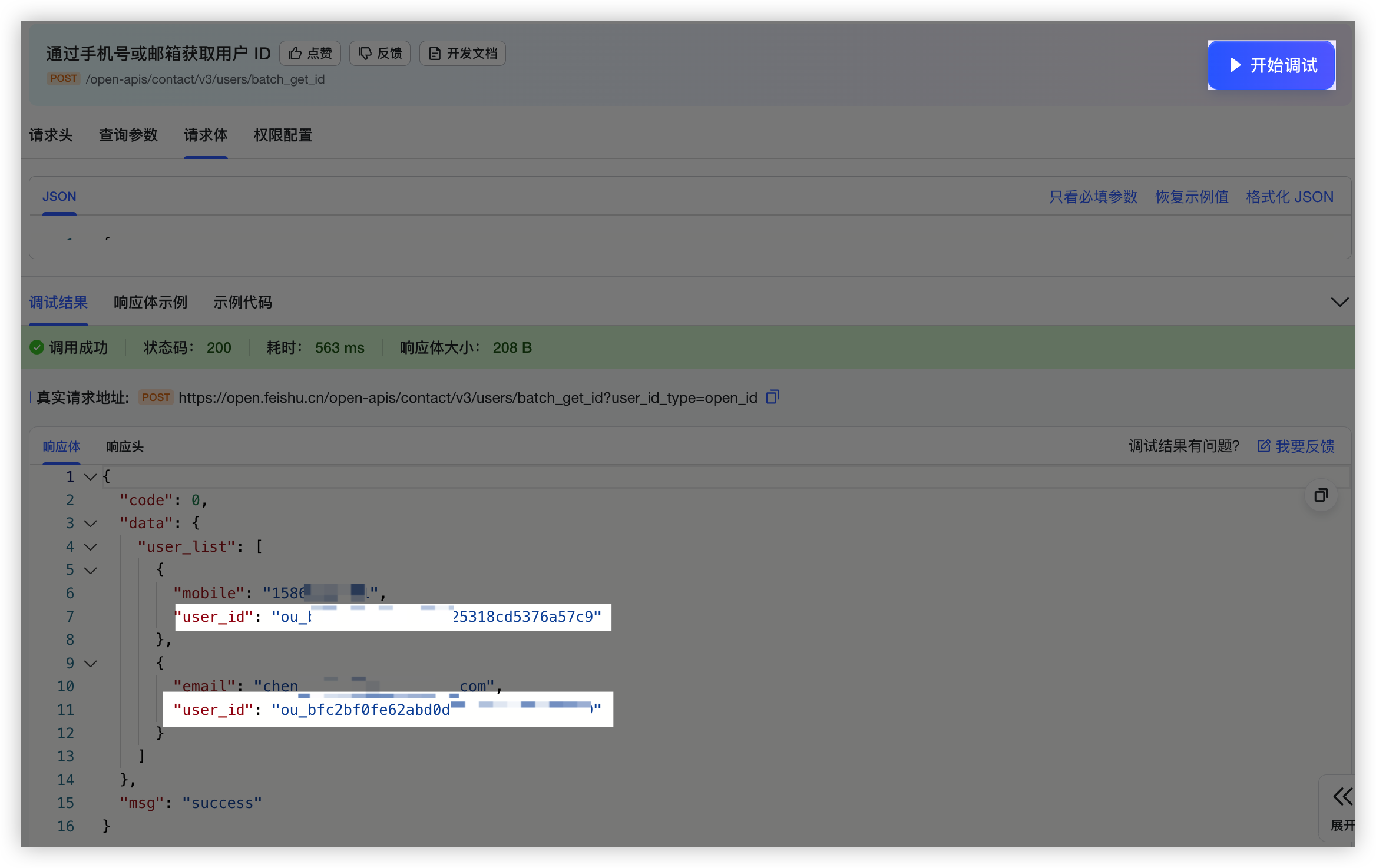
1. 打开 [API 调试台](https://open.feishu.cn/api-explorer/cli_a278b89588fb100d?apiName=batch_get_id&from=op_doc_tab&project=contact&resource=user&version=v3),在左侧 API 目录中找到「**通讯录**」下的「**通过手机号或邮箱获取用户 ID**」,点击该 API 切换当前调试 API 为「通过手机号或邮箱获取用户 ID」。
2. 点击 API 调试台左侧 **查看鉴权凭证** 中 tenant_access_token 中的 **点击获取**。
3. 点击右侧参数列表,将 **查询参数** 中的 **user_id_type** 参数设置为需要获取的 ID 类型。

4. 切换至 **请求体** Tab,将请求体中的示例 ID 删除,并修改为需要查询的手机号或 Email。

5. 点击右侧 **开始调试**,调用成功后,在下方 **响应体** 中即可获取到查询的 User ID。响应体中返回的用户 ID 类型由查询参数中设置的 **user_id_type** 参数决定。
200380 | Failed to create card content, ext=ErrCode: 200380; ErrMsg: template does not exist, please confirm whether this template has been released; ErrorValue: templateID: %v | 未找到卡片。请确认当前模版卡片已保存并发布,参考[预览与发布卡片](https://open.feishu.cn/document/uAjLw4CM/ukzMukzMukzM/feishu-cards/feishu-card-cardkit/preview-and-publish-cards#4c818412)。
1. 在[飞书卡片搭建工具](https://open.feishu.cn/cardkit?from=open_docs_preview_and_publish)目标卡片编辑页面的右上角,点击 **保存**,然后点击 **发布**。

2. 在 **发布卡片** 对话框,设置 **卡片版本号**,并点击 **发布**。首次发布时版本号一般设置为 `1.0.0`。

3. 发布卡片后,你可参考[发送由搭建工具构建的卡片](https://open.feishu.cn/document/uAjLw4CM/ukzMukzMukzM/feishu-cards/send-feishu-card)调用 API 发送卡片。
卡片发布后,将对线上的卡片相关的 API 调用立即生效。你需确认本次发布是否会对服务端代码逻辑产生不兼容变更。为避免此类情况,在请求发送卡片时,你可将 `template_version_name` 参数设置为固定的卡片版本号,避免在工具上发布卡片后立即影响线上业务逻辑。
200381 | Failed to create card content, ext=ErrCode: 200381; ErrMsg: template is not visible to app, please confirm whether the app is allowed to use this template; ErrorValue: %v, templateID: %v | 无卡片使用权限。请检查当前发送卡片的应用或自定义机器人是否具有该卡片的使用权限,参考[管理卡片模板权限](https://open.feishu.cn/document/uAjLw4CM/ukzMukzMukzM/feishu-cards/feishu-card-cardkit/manage-card-template#4530c6a7)。
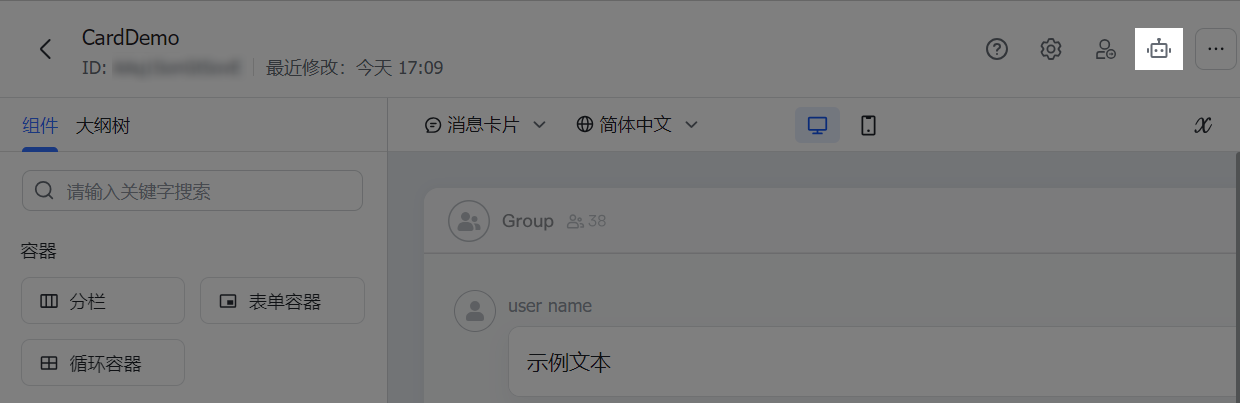
1. 在卡片模板的编辑页面,点击应用图标。
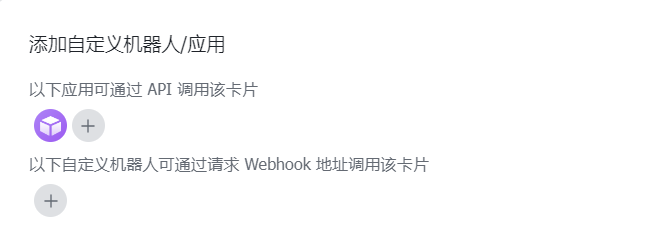
2. 在 **添加自定义机器人/应用** 弹窗中,添加应用或自定义机器人,使该应用或自定义机器人拥有调用该卡片模板的权限。
200621 | Failed to create card content, ext=ErrCode: 200621; ErrMsg: parse card json err, please check whether the card json is correct; ErrorValue: %v | 卡片 JSON 格式错误。请参考[卡片 JSON 代码结构](https://open.feishu.cn/document/uAjLw4CM/ukzMukzMukzM/feishu-cards/card-json-structure)检查卡片内容。
200732 | Failed to create card content, ext=ErrCode: 200732; ErrMsg: the actual type of the variable is inconsistent with the specified type in the template. Please check the type of the variable; ErrorValue: %v, specifiedType: %v, actualType: %v | 卡片变量类型错误。请检查发送模版卡片时使用的变量的数据类型与构造该模版时指定的变量数据类型是否一致。
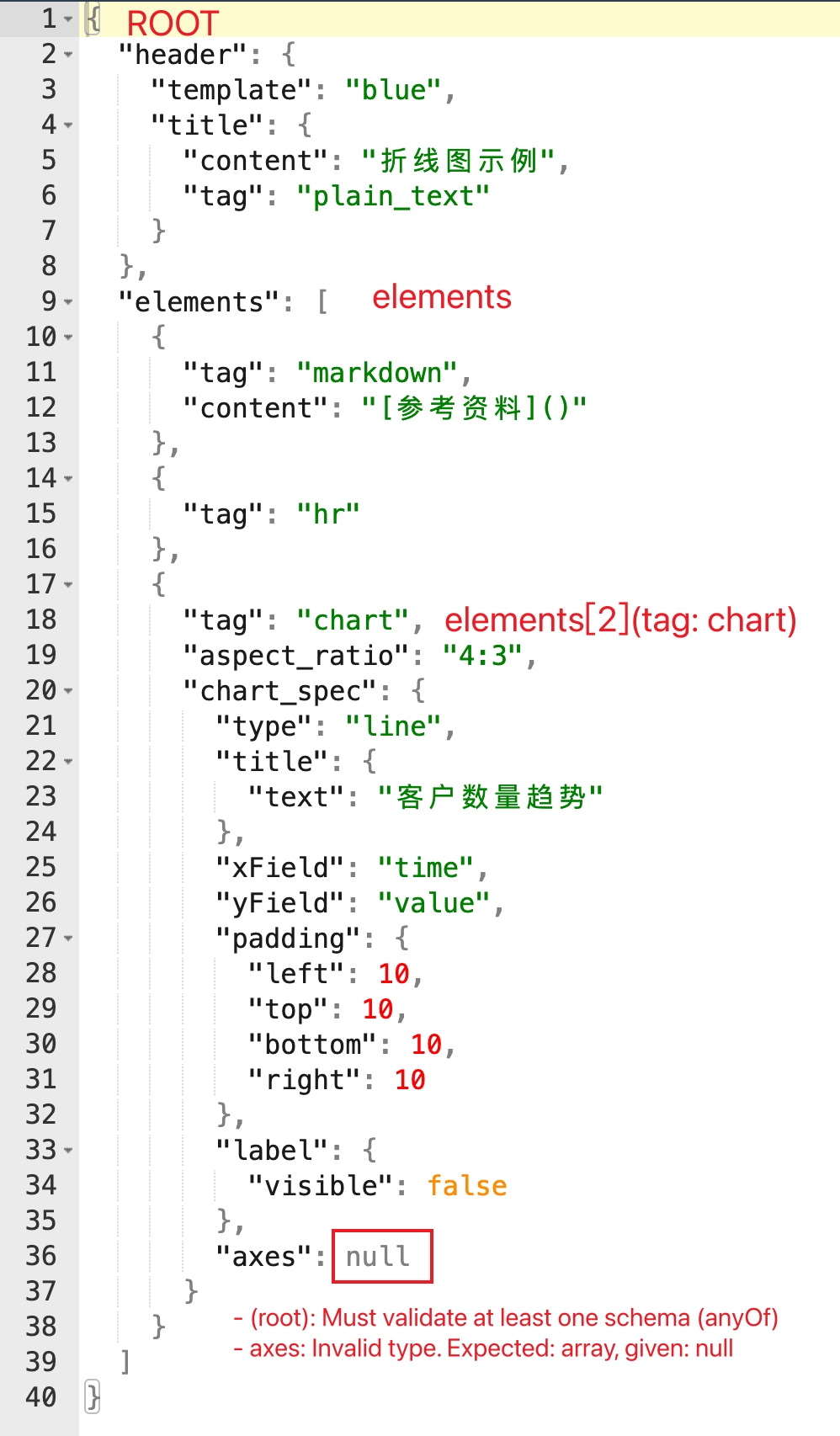
200550 | Failed to create card content, ext=ErrCode: 200550; ErrPath: ROOT -> elements -> %v; ErrMsg: chart spec is invalid; ErrorValue: %v | 卡片中的图表组件配置错误。请检查图表组件中的 chart_spec 属性配置是否正确,参考[图表](https://open.feishu.cn/document/uAjLw4CM/ukzMukzMukzM/feishu-cards/card-components/content-components/chart#39ee4e65)组件。
```json
{
"code": 230099,
"msg": "Failed to create card content, ext=ErrCode: 200550; ErrPath: ROOT -> elements -> [2](tag: chart); ErrMsg: chart spec is invalid; ErrorValue: - (root): Must validate at least one schema (anyOf)\n- axes: Invalid type. Expected: array, given: null\n; ",
"error": {
"log_id": "202409131613579778D691D6E05516DE2D",
"troubleshooter": "排查建议查看(Troubleshooting suggestions): https://open.feishu.cn/search?from=openapi&log_id=202409131613579778D691D6E05516DE2D&code=230099&method_id=6921911482032898068"
}
}
```
ErrPath 示例说明: ROOT -> elements -> [2](tag: chart)
200861 | Failed to create card content, ext=ErrCode: 200861; ErrPath: ROOT -> body -> elements -> %v; ErrMsg: cards of schema V2 no longer support this capability; ErrorValue: unsupported tag %v | 卡片中使用了schema 1 支持但 schema 2 不再支持的组件。请检查卡片内容,移除或替换不支持的标签,参考 [废弃组件说明文档](https://open.feishu.cn/document/uAjLw4CM/ukzMukzMukzM/feishu-cards/card-json-v2-breaking-changes-release-notes#47cd6626)。
200570 | Failed to create card content, ext=ErrCode: 200570; ErrMsg: card contains invalid image keys; ErrorValue: image key %v | 卡片中的图片资源无效。请检查卡片中是否使用了正确的 img_key,你可以调用[上传图片](https://open.feishu.cn/document/uAjLw4CM/ukTMukTMukTM/reference/im-v1/image/create)接口或在搭建工具中上传图片,获取图片的 key。
200914 | table rows is invalid | 表格行无效。可能原因与排查方案:
- 表格的 rows 部分不是一个合法的 JSON,示例参考[表格 JSON 结构](https://open.feishu.cn/document/uAjLw4CM/ukzMukzMukzM/feishu-cards/card-components/content-components/table#51c332ce)。
- 单元格数据类型解析错误。例如,某列的单元格类型是富文本,但该列该行的数据按富文本解析失败。该场景下可根据返回的单元格行列索引(从 0 开始计数),定位问题单元格,然后参考[表格](https://open.feishu.cn/document/uAjLw4CM/ukzMukzMukzM/feishu-cards/card-components/content-components/table)中的 **data_type 字段说明**,检查是否配置有误。
更多错误码信息,参见[通用错误码](https://open.feishu.cn/document/ukTMukTMukTM/ugjM14COyUjL4ITN)。