# 发送消息
调用该接口向指定用户或者群聊发送消息。支持发送的消息类型包括文本、富文本、卡片、群名片、个人名片、图片、视频、音频、文件以及表情包等。
## 前提条件
- 应用需要开启[机器人能力](https://open.feishu.cn/document/uAjLw4CM/ugTN1YjL4UTN24CO1UjN/trouble-shooting/how-to-enable-bot-ability)。 开启能力后需要发布版本才能生效,参考 [发布应用](https://open.feishu.cn/document/home/introduction-to-custom-app-development/self-built-application-development-process#baf09c7d)。
- 给用户发送消息时,用户需要在机器人的[可用范围](https://open.feishu.cn/document/home/introduction-to-scope-and-authorization/availability)内。
- 给群组发送消息时,机器人需要在该群组中,且在群组内拥有发言权限。
## 使用限制
- 为避免消息发送频繁对用户造成打扰,向同一用户发送消息的限频为 ==5 QPS==、向同一群组发送消息的限频为群内机器人共享 ==5 QPS==。
- 该接口仅支持在开发者后台创建的应用机器人调用,群自定义机器人无法调用该接口。了解群自定义机器人的使用方式,参见[自定义机器人使用指南](https://open.feishu.cn/document/ukTMukTMukTM/ucTM5YjL3ETO24yNxkjN)。
## 请求
基本 |
---|---
HTTP URL | https://open.feishu.cn/open-apis/im/v1/messages
HTTP Method | POST
接口频率限制 | [1000 次/分钟、50 次/秒](https://open.feishu.cn/document/ukTMukTMukTM/uUzN04SN3QjL1cDN)
支持的应用类型 | Custom App、Store App
权限要求
**调用该 API 所需的权限。开启其中任意一项权限即可调用**
开启任一权限即可 | 获取与发送单聊、群组消息(im:message)
以应用的身份发消息(im:message:send_as_bot)
发送消息V2(im:message:send)
**注意事项**:1. **应用身份**发消息
* 需申请下面三个权限之一: **获取与发送单聊、群组消息**(im:message)**以应用的身份发消息**(im:message:send_as_bot)**发送消息V2【历史版本】**(im:message:send)
2. **用户身份**发消息
* 需同时申请以下两个权限: **获取与发送单聊、群组消息**(im:message)、 **以用户身份发送消息**(im:message.send_as_user)
字段权限要求 | **注意事项**:该接口返回体中存在下列敏感字段,仅当开启对应的权限后才会返回;如果无需获取这些字段,则不建议申请
获取用户 user ID(contact:user.employee_id:readonly)
### 请求头
名称 | 类型 | 必填 | 描述
---|---|---|---
Authorization | string | 是 | `tenant_access_token`
或
`user_access_token`
**值格式**:"Bearer `access_token`"
**示例值**:"Bearer u-7f1bcd13fc57d46bac21793a18e560"
[了解更多:如何选择与获取 access token](https://open.feishu.cn/document/uAjLw4CM/ugTN1YjL4UTN24CO1UjN/trouble-shooting/how-to-choose-which-type-of-token-to-use)
Content-Type | string | 是 | **固定值**:"application/json; charset=utf-8"
### 查询参数
名称 | 类型 | 必填 | 描述
---|---|---|---
receive_id_type | string | 是 | 消息接收者 ID 类型。支持 open_id/union_id/user_id/email/chat_id
**示例值**:open_id
**可选值有**:
- open_id:标识一个用户在某个应用中的身份。同一个用户在不同应用中的 Open ID 不同。[了解更多:如何获取 Open ID](https://open.feishu.cn/document/uAjLw4CM/ugTN1YjL4UTN24CO1UjN/trouble-shooting/how-to-obtain-openid)
- union_id:标识一个用户在某个应用开发商下的身份。同一用户在同一开发商下的应用中的 Union ID 是相同的,在不同开发商下的应用中的 Union ID 是不同的。通过 Union ID,应用开发商可以把同个用户在多个应用中的身份关联起来。[了解更多:如何获取 Union ID?](https://open.feishu.cn/document/uAjLw4CM/ugTN1YjL4UTN24CO1UjN/trouble-shooting/how-to-obtain-union-id)
- user_id:标识一个用户在某个租户内的身份。同一个用户在租户 A 和租户 B 内的 User ID 是不同的。在同一个租户内,一个用户的 User ID 在所有应用(包括商店应用)中都保持一致。User ID 主要用于在不同的应用间打通用户数据。[了解更多:如何获取 User ID?](https://open.feishu.cn/document/uAjLw4CM/ugTN1YjL4UTN24CO1UjN/trouble-shooting/how-to-obtain-user-id)。
- email:以用户的真实邮箱来标识用户。
- chat_id:以群 ID 来标识群聊。[了解更多:如何获取群 ID ](https://open.feishu.cn/document/uAjLw4CM/ukTMukTMukTM/reference/im-v1/chat-id-description)
**当值为 `user_id`,字段权限要求**:
获取用户 user ID(contact:user.employee_id:readonly)
### 请求体
名称 | 类型 | 必填 | 描述
---|---|---|---
receive_id | string | 是 | 消息接收者的 ID,ID 类型与查询参数 `receive_id_type` 的取值一致。
**注意事项**:
- 给用户发送消息时,用户需要在机器人的[可用范围](https://open.feishu.cn/document/home/introduction-to-scope-and-authorization/availability)内。例如,你需要给企业全员发送消息,则需要将应用的可用范围设置为全体员工。
- 给群组发送消息时,机器人需要在该群组中,且在群组内拥有发言权限。
- 如果消息接收者为用户,推荐使用用户的 `open_id`。
**示例值**:"ou_7d8a6e6df7621556ce0d21922b676706ccs"
msg_type | string | 是 | 消息类型。
**可选值有**:
- text:文本
- post:富文本
- image:图片
- file:文件
- audio:语音
- media:视频
- sticker:表情包
- interactive:卡片
- share_chat:分享群名片(被分享的群名片有效期为 7 天)
- share_user:分享个人名片
- system:系统消息。该类型仅支持在机器人单聊内推送系统消息,不支持在群聊内使用,例如下图所示突出新会话。
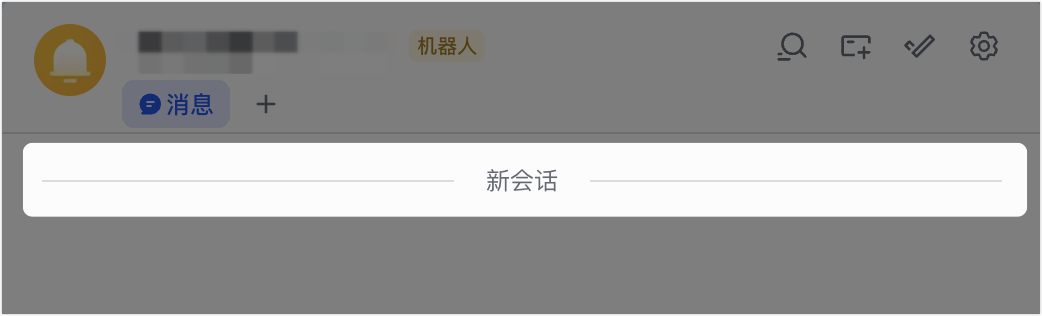
不同消息类型的详细介绍,参见[发送消息内容](https://open.feishu.cn/document/uAjLw4CM/ukTMukTMukTM/im-v1/message/create_json)。
**示例值**:"text"
content | string | 是 | 消息内容,JSON 结构序列化后的字符串。该参数的取值与 `msg_type` 对应,例如 `msg_type` 取值为 `text`,则该参数需要传入文本类型的内容。
**注意:**
- JSON 字符串需进行转义。例如,换行符 `\n` 转义后为 `\\n`。
- 文本消息请求体最大不能超过 150 KB。
- 卡片消息、富文本消息请求体最大不能超过 30 KB。
- 如果使用卡片模板(template_id)发送消息,实际大小也包含模板对应的卡片数据大小。
- 如果消息中包含样式标签,会使实际消息体长度大于您输入的请求体长度。
- 图片需要先[上传图片](https://open.feishu.cn/document/uAjLw4CM/ukTMukTMukTM/reference/im-v1/image/create),然后使用图片的 Key 发消息。
- 音频、视频、文件需要先[上传文件](https://open.feishu.cn/document/uAjLw4CM/ukTMukTMukTM/reference/im-v1/file/create),然后使用文件的 Key 发消息。注意不能使用云文档[上传素材](https://open.feishu.cn/document/uAjLw4CM/ukTMukTMukTM/reference/drive-v1/media/upload_all)接口返回的 file_token。
了解不同类型的消息内容格式、使用限制,可参见[发送消息内容](https://open.feishu.cn/document/uAjLw4CM/ukTMukTMukTM/im-v1/message/create_json)。
**示例值**:"{\"text\":\"test content\"}"
uuid | string | 否 | 自定义设置的唯一字符串序列,用于在发送消息时请求去重。持有相同 uuid 的请求,在 1 小时内至多成功发送一条消息。
**注意**:你可以参考示例值自定义参数值。当发送不同的消息内容时,如果传入了该参数,则需要在每次请求时都更换该参数的取值。
**示例值**:"选填,每次调用前请更换,如a0d69e20-1dd1-458b-k525-dfeca4015204"
**数据校验规则**:
- 最大长度:`50` 字符
### 请求体示例
```json
{
"receive_id": "ou_7d8a6e6df7621556ce0d21922b676706ccs",
"msg_type": "text",
"content": "{\"text\":\"test content\"}",
"uuid": "选填,每次调用前请更换,如a0d69e20-1dd1-458b-k525-dfeca4015204"
}
```
**发送卡片请求示例**
以下为发送由 JSON 构建的卡片代码示例,了解其它发送卡片方式的请求体示例,参考[发送消息内容结构-卡片](https://open.feishu.cn/document/uAjLw4CM/ukTMukTMukTM/im-v1/message/create_json#3ea4c2d5)。
```json
{
"receive_id": "ou_7d8a6e6df7621556ce0d21922b676706ccs",
"msg_type": "interactive",
"content": "{\"elements\":[{\"tag\":\"markdown\",\"content\":\"普通文本\\n\\n // at 指定用户\\n // 使用 open_id @ 指定人\\n // 使用 user_id @ 指定人\\n // 使用邮箱地址 @ 指定人\\n // at 所有人\\n \"}]}"
}
```
**cURL 请求示例**
```json
curl --location --request POST 'https://open.feishu.cn/open-apis/im/v1/messages?receive_id_type=chat_id' \
--header 'Authorization: Bearer t-XXX' \
--header 'Content-Type: application/json; charset=utf-8' \
--data-raw '{
"receive_id": "oc_84983ff6516d731e5b5f68d4ea2e1da5",
"msg_type": "text",
"content": "{\"text\":\"test content\"}"
}'
```
**Python 请求示例**
```python
import json
import requests
def send():
url = "https://open.feishu.cn/open-apis/im/v1/messages"
params = {"receive_id_type":"chat_id"}
msg = "text content"
msgContent = {
"text": msg,
}
req = {
"receive_id": "oc_xxx", # chat id
"msg_type": "text",
"content": json.dumps(msgContent)
}
payload = json.dumps(req)
headers = {
'Authorization': 'Bearer xxx', # your access token
'Content-Type': 'application/json'
}
response = requests.request("POST", url, params=params, headers=headers, data=payload)
print(response.headers['X-Tt-Logid']) # for debug or oncall
print(response.content) # Print Response
if __name__ == '__main__':
send()
```
**Go 请求示例**
请参考[机器人自动拉群报警教程(含 Go 示例代码)](https://open.feishu.cn/document/uAjLw4CM/ukTMukTMukTM/reference/im-v1/message-development-tutorial/determine-the-api-and-event-to-call)
## 响应
### 响应体
名称 | 类型 | 描述
---|---|---
code | int | 错误码,非 0 表示失败
msg | string | 错误描述
data | message | \-
message_id | string | 消息 ID。成功发送消息后,由系统生成的唯一 ID 标识。后续对消息的管理维护操作均需要使用该 ID。
root_id | string | 根消息 ID,仅在回复消息场景会有返回值。了解 root_id 可参见[消息管理概述](https://open.feishu.cn/document/uAjLw4CM/ukTMukTMukTM/reference/im-v1/message/intro)。
parent_id | string | 父消息 ID,仅在回复消息场景会有返回值。了解 parent_id 可参见[消息管理概述](https://open.feishu.cn/document/uAjLw4CM/ukTMukTMukTM/reference/im-v1/message/intro)。
thread_id | string | 消息所属的话题 ID,仅在话题场景会有返回值。了解话题可参见[话题概述](https://open.feishu.cn/document/uAjLw4CM/ukTMukTMukTM/reference/im-v1/message/thread-introduction)。
msg_type | string | 消息类型。
**可能值有**:
- text:文本
- post:富文本
- image:图片
- file:文件
- audio:语音
- media:视频
- sticker:表情包
- interactive:卡片
- share_chat:分享群名片(被分享的群名片有效期为 7 天)
- share_user:分享个人名片
- system:系统消息
create_time | string | 消息生成的时间戳。单位:毫秒
update_time | string | 消息更新的时间戳。单位:毫秒
deleted | boolean | 消息是否被撤回。发送消息时只会返回 false,表示未被撤回。
updated | boolean | 消息是否被更新。发送消息时只会返回 false,表示未被更新。
chat_id | string | 消息所属的群 ID。你可以调用[获取群信息](https://open.feishu.cn/document/uAjLw4CM/ukTMukTMukTM/reference/im-v1/chat/get)接口,根据群 ID 获取群详情。
sender | sender | 消息的发送者信息。
id | string | 发送者的 ID。
id_type | string | 发送者的 ID 类型。
**可能值有:**
- `open_id`:表示发送者为用户,且返回的 ID 是用户的 open_id。
- `app_id`:表示发送者为应用,且返回的 ID 是应用的 app_id。
sender_type | string | 发送者类型。
**可能值有:**
- `user`: 用户
- `app`: 应用
- `anonymous`: 匿名(未生效,不会返回该值)
- `unknown`: 未知(未生效,不会返回该值)
tenant_key | string | 租户唯一标识。该标识用来识别租户,也可以用来获取租户访问凭证(tenant_access_token)。
body | message_body | 通过 `body` 内的 `content` 参数,返回所发送的消息内容。
content | string | 消息内容,JSON 结构序列化后的字符串,不同消息类型(`msg_type`)对应不同内容。
mentions | mention\[\] | 发送的消息内,被 @ 的用户列表。
key | string | 被 @ 的用户序号。例如,第 3 个被 @ 到的成员,取值为 `@_user_3`。
id | string | 被 @ 的用户的 open_id。
id_type | string | 被 @ 的用户的 ID 类型,目前仅支持 `open_id` (了解[什么是 Open ID](https://open.feishu.cn/document/home/user-identity-introduction/open-id))。
name | string | 被 @ 的用户姓名。
tenant_key | string | 租户唯一标识。该标识用来识别被 @ 用户的租户,也可以用来获取租户访问凭证(tenant_access_token)。
upper_message_id | string | 合并转发消息中,上一层级的消息 ID,仅在合并转发场景会有返回值。了解 upper_message_id 可参见[消息管理概述](https://open.feishu.cn/document/uAjLw4CM/ukTMukTMukTM/reference/im-v1/message/intro)。
### 响应体示例
```json
{
"code": 0,
"msg": "success",
"data": {
"message_id": "om_dc13264520392913993dd051dba21dcf",
"root_id": "om_40eb06e7b84dc71c03e009ad3c754195",
"parent_id": "om_d4be107c616aed9c1da8ed8068570a9f",
"thread_id": "omt_d4be107c616a",
"msg_type": "interactive",
"create_time": "1615380573411",
"update_time": "1615380573411",
"deleted": false,
"updated": false,
"chat_id": "oc_5ad11d72b830411d72b836c20",
"sender": {
"id": "cli_9f427eec54ae901b",
"id_type": "app_id",
"sender_type": "app",
"tenant_key": "736588c9260f175e"
},
"body": {
"content": "{\"text\":\"@_user_1 test content\"}"
},
"mentions": [
{
"key": "@_user_1",
"id": "ou_155184d1e73cbfb8973e5a9e698e74f2",
"id_type": "open_id",
"name": "Tom",
"tenant_key": "736588c9260f175e"
}
],
"upper_message_id": "om_40eb06e7b84dc71c03e009ad3c754195"
}
}
```
### 错误码
HTTP状态码 | 错误码 | 描述 | 排查建议
---|---|---|---
400 | 230001 | Your request contains an invalid request parameter. | 参数错误,可根据接口实际返回的错误信息,并参考接口文档内容,检查输入参数是否填写错误。可根据 `ext` 信息查看[如何解决 230001 错误
](https://open.feishu.cn/document/uAjLw4CM/ugTN1YjL4UTN24CO1UjN/trouble-shooting/how-to-resolve-error-230001)文档排查解决。
400 | 230002 | The bot can not be outside the group. | 机器人不在对应群组中。你需要将应用机器人添加到消息相应的群组中。如何添加机器人参考[机器人使用指南](https://open.feishu.cn/document/ukTMukTMukTM/uATM04CMxQjLwEDN)。
400 | 230006 | Bot ability is not activated. | 应用未启用机器人能力。启用方式参见[如何启用机器人能力](https://open.feishu.cn/document/uAjLw4CM/ugTN1YjL4UTN24CO1UjN/trouble-shooting/how-to-enable-bot-ability)。
400 | 230013 | Bot has NO availability to this user. | 目标用户(以用户的 user_id/open_id/union_id/email 指定的消息接收者)或单聊用户(以群聊的 chat_id 指定的消息接收者,但 chat_id 对应的群聊类型为单聊 `p2p`)不在应用机器人的可用范围内,或者是在应用的禁用范围内。
**注意**:如果目标用户已离职,也会报错 230013。
解决方案:
1. 登录[开发者后台](https://open.feishu.cn/app),找到并进入指定应用详情页。
2. 在左侧导航栏进入 **应用发布** > **版本管理与发布** 页面,点击 **创建版本**。
3. 在 **版本详情** 页面,找到 **可用范围** 区域,点击 **编辑**。
4. 在弹出的对话框内,配置应用的可用范围,将用户添加至可用范围内。
5. 在页面底部点击 **保存**,并发布应用使配置生效。
6. (可选)如果以上配置完成后仍报错,则需要联系企业管理员登录[管理后台](https://feishu.cn/admin),在 **工作台** > **应用管理** 中进入指定应用详情页,在 **应用可用范围** 内查看该用户是否被设置为了 **禁用成员**。
具体操作参见[配置应用可用范围](https://open.feishu.cn/document/home/introduction-to-scope-and-authorization/availability)。
400 | 230015 | P2P chat can NOT be shared. | 不能分享单聊的名片。只能分享群聊的群名片,或者用户的个人名片。
400 | 230017 | Bot is NOT the owner of the resource. | 机器人不是资源的拥有者。机器人只能发送自己上传的文件,文件上传方式参见[上传文件](https://open.feishu.cn/document/uAjLw4CM/ukTMukTMukTM/reference/im-v1/file/create)。
400 | 230018 | These operations are NOT allowed at current group settings. | 当前操作被群设置禁止,例如群聊设置了仅指定成员可以在此群发言。请检查群设置或联系群管理员修改群设置。
400 | 230019 | The topic does NOT exist. | 当前话题不存在,无法执行该操作。
400 | 230020 | This operation triggers the frequency limit. | 当前操作触发频率限制,请降低请求频率后重试。
400 | 230022 | The content of the message contains sensitive information. | 消息内容包含敏感信息,请修改消息内容后重试。
400 | 230025 | The length of the message content reaches its limit. | 消息体长度超出限制。文本消息最大不能超过 150 KB、卡片及富文本消息最大不能超过 30 KB。需要注意:
- 若使用卡片模板(template_id)发送消息,实际大小也包含模板对应的卡片数据大小。
- 若消息中包含大量样式标签,会使实际消息体长度大于传入的请求体长度。
400 | 230027 | Lack of necessary permissions. | 无权进行本次操作。可能的原因有:
1. 缺少相应权限,可根据实际的错误信息进行排查。
2. 未检查到用户授权信息。
3. 如果需要机器人在外部群操作,则需要先为机器人开启对外共享能力,详情参见[机器人支持外部群和外部用户单聊](https://open.feishu.cn/document/uAjLw4CM/ukzMukzMukzM/develop-robots/add-bot-to-external-group)。
400 | 230099 | Failed to create card content. | 创建卡片内容失败,请参考当前接口返回的具体报错信息,并参照接口文档中的 [子错误码](https://open.feishu.cn/document/uAjLw4CM/ukTMukTMukTM/reference/im-v1/message/create#-f367d31) 排查建议解决。
400 | 230028 | The messages do NOT pass the audit. | 消息的数据防泄漏审查未通过。当消息内容包含有明文电话号码、明文邮箱地址等内容时可能会触发该错误。请根据接口返回的实际错误信息检查并修改消息内容。
400 | 230029 | User has resigned. | 指定的用户已离职,无法发送消息。
400 | 230034 | The receive_id is invalid. | 消息接收者 ID(receive_id)无效,请传入与 receive_id_type 类型相匹配的 ID,且保证 ID 正确。
400 | 230035 | Send Message Permission deny. | 没有发送消息的权限。请排查群聊是否已开启禁言、机器人是否被接收者屏蔽或受到租户维度的沟通权限管控。
400 | 230036 | Tenant crypt key has been deleted. | 租户加密密钥已被删除,导致被该秘钥加密的数据不可用。请联系企业管理员进行解决。
400 | 230038 | Cross tenant p2p chat operate forbid. | 跨租户的单聊不允许通过本接口发送消息。
400 | 230049 | The message is being sent. | 消息正在发送中,请稍后。
400 | 230053 | The user has stopped the bot from sending messages. | 用户已设置不再接收机器人消息,无法主动给用户发送单聊消息。
400 | 230054 | This type of message is unavailable in the connection group. | 私有互通群不支持发送特定的消息类型。如卡片消息。
400 | 230055 | The type of file upload does not match the type of message being sent. | 文件上传时选择的类型与发送的消息类型不匹配。例如,上传文件时,选择的文件格式为 MP4,则发送消息时消息类型需要为视频(media)。
400 | 230075 | Sending encrypted messages is not supported. | 不支持向密聊、密盾聊中发送消息。
400 | 232009 | Your request specifies a chat which has already been dissolved. | 指定的群已被解散,无法发送消息。可参考 [群 ID 说明](https://open.feishu.cn/document/uAjLw4CM/ukTMukTMukTM/reference/im-v1/chat-id-description#2c14aa7f)获取可用的群 ID 后重试。
### 230099 子错误码
错误码 | 描述 | 排查建议
---|---|---
100290 | Failed to create card content, ext=ErrCode: 100290; ErrMsg: There is an invalid user resource(at/person) in your card; ErrorValue: %v | 卡片中存在无效的人员 id。请检查卡片中的 at 人、人员等组件中使用的用户 id 值是否正确,参考[如何获取不同的用户 ID](https://open.feishu.cn/document/home/user-identity-introduction/open-id)。
1. 打开 [API 调试台](https://open.feishu.cn/api-explorer/cli_a278b89588fb100d?apiName=batch_get_id&from=op_doc_tab&project=contact&resource=user&version=v3),在左侧 API 目录中找到「**通讯录**」下的「**通过手机号或邮箱获取用户 ID**」,点击该 API 切换当前调试 API 为「通过手机号或邮箱获取用户 ID」。
2. 点击 API 调试台左侧 **查看鉴权凭证** 中 tenant_access_token 中的 **点击获取**。
3. 点击右侧参数列表,将 **查询参数** 中的 **user_id_type** 参数设置为需要获取的 ID 类型。
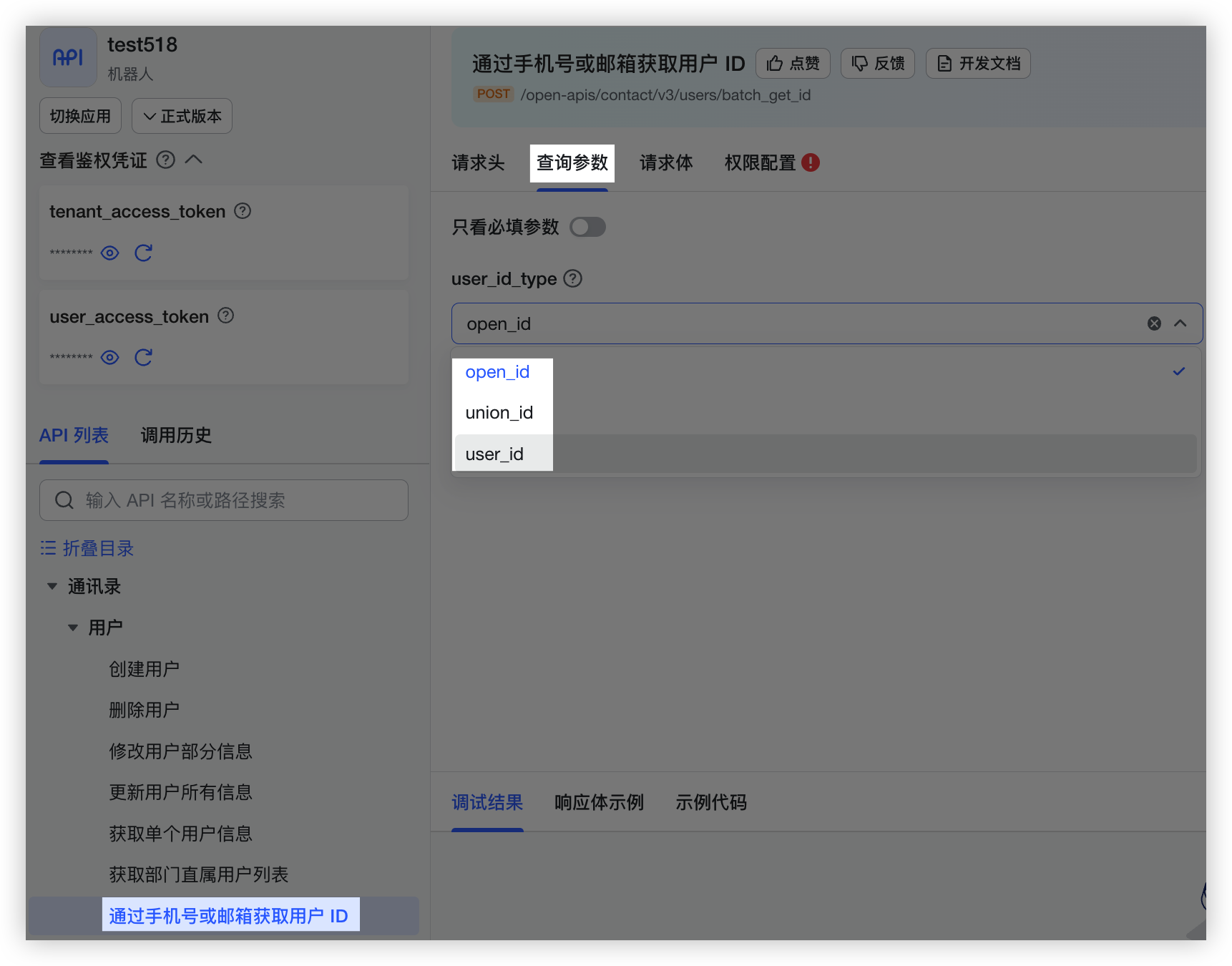
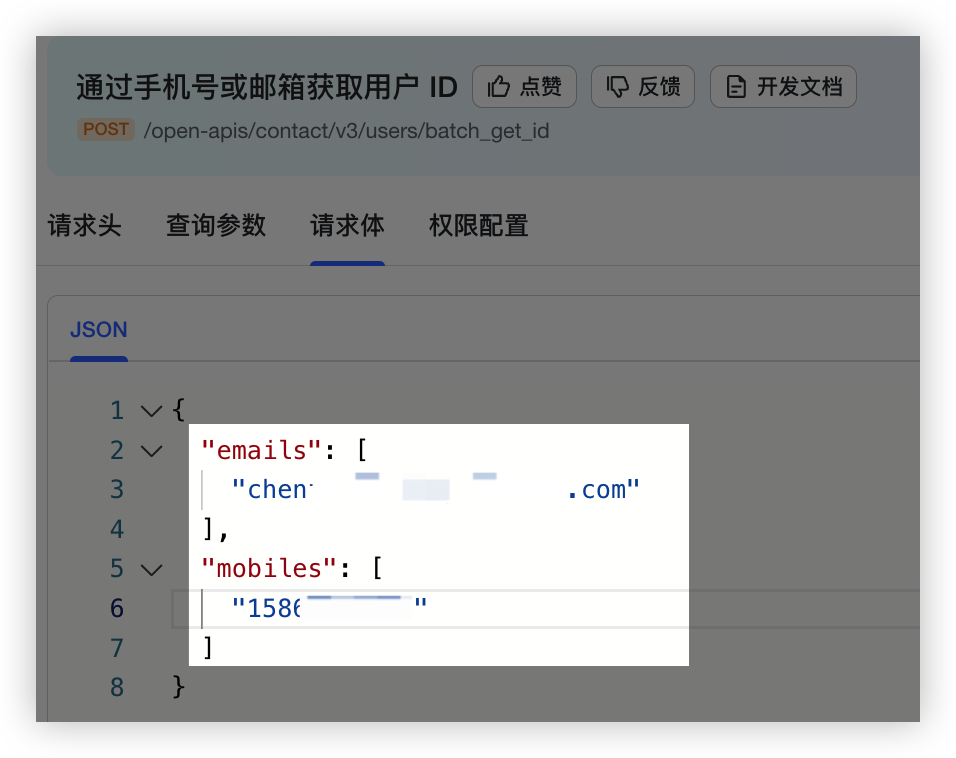
4. 切换至 **请求体** Tab,将请求体中的示例 ID 删除,并修改为需要查询的手机号或 Email。
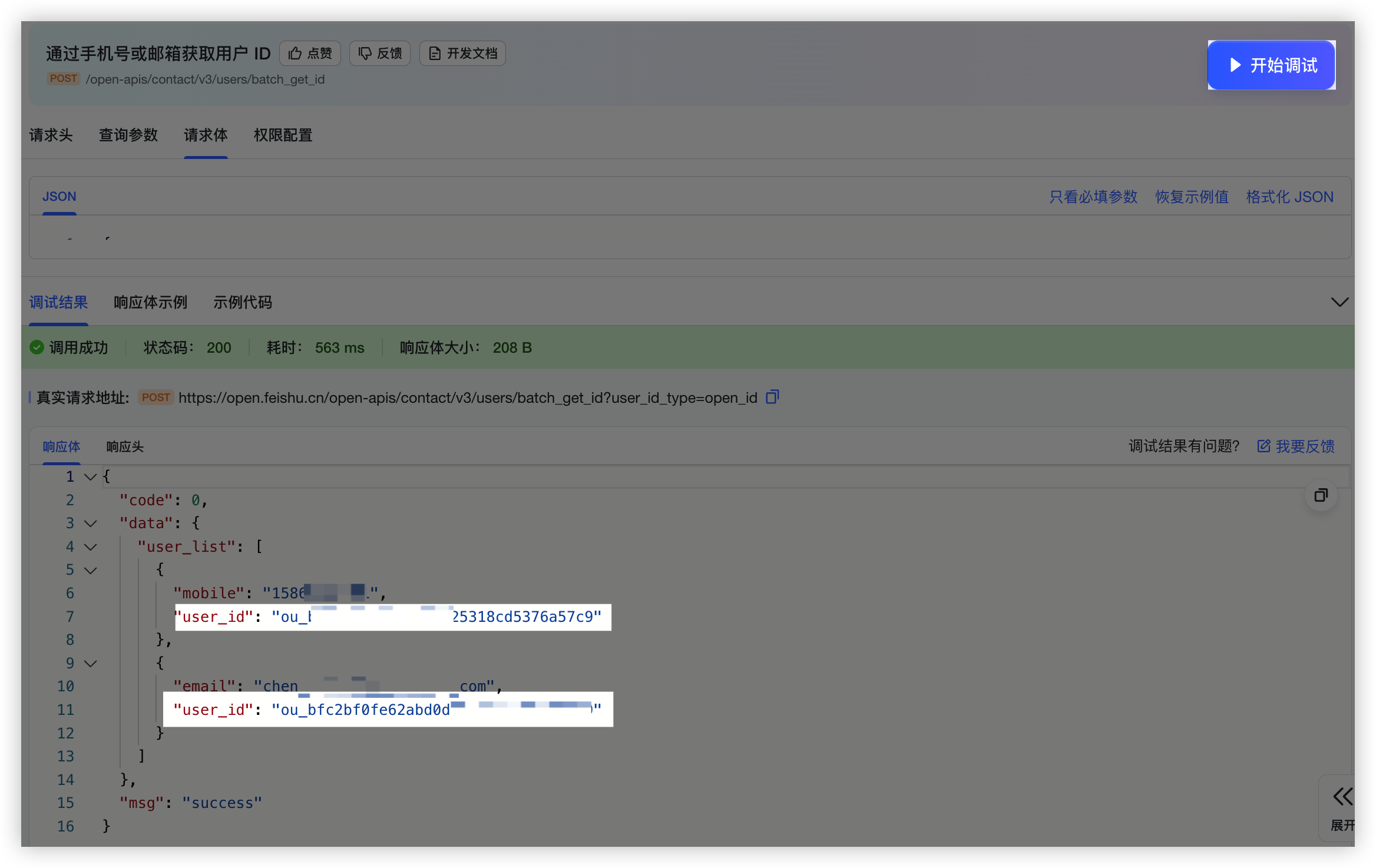
5. 点击右侧 **开始调试**,调用成功后,在下方 **响应体** 中即可获取到查询的 User ID。响应体中返回的用户 ID 类型由查询参数中设置的 **user_id_type** 参数决定。
11310 | Failed to create card content, ext=ErrCode: 11310; ErrMsg: %v; code:230099 | - 若 ErrMsg 提示 "template is not visible to app, please confirm whether the app is allowed to use this template",你需确保卡片的所有者在调用应用的[可用范围](https://open.feishu.cn/document/home/introduction-to-scope-and-authorization/availability)内;
- 若 ErrMsg 提示 "element exceeds the limit",表示 JSON 2.0 结构的卡片超过 200 个组件或元素的限制。请减少组件或元素的数量并重试。
- 若 ErrMsg 提示 "card action is lock",表示 JSON 2.0 结构的卡片正在交互中,无法进行更新。
200380 | Failed to create card content, ext=ErrCode: 200380; ErrMsg: template does not exist, please confirm whether this template has been released; ErrorValue: templateID: %v | 未找到卡片。请确认当前模版卡片已保存并发布,参考[预览与发布卡片](https://open.feishu.cn/document/uAjLw4CM/ukzMukzMukzM/feishu-cards/feishu-card-cardkit/preview-and-publish-cards#4c818412)。
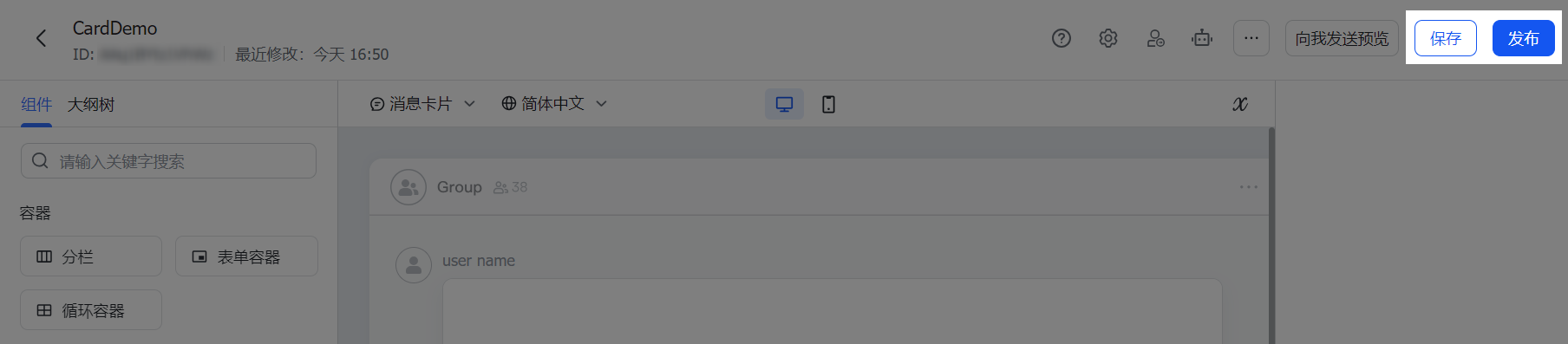
1. 在[飞书卡片搭建工具](https://open.feishu.cn/cardkit?from=open_docs_preview_and_publish)目标卡片编辑页面的右上角,点击 **保存**,然后点击 **发布**。
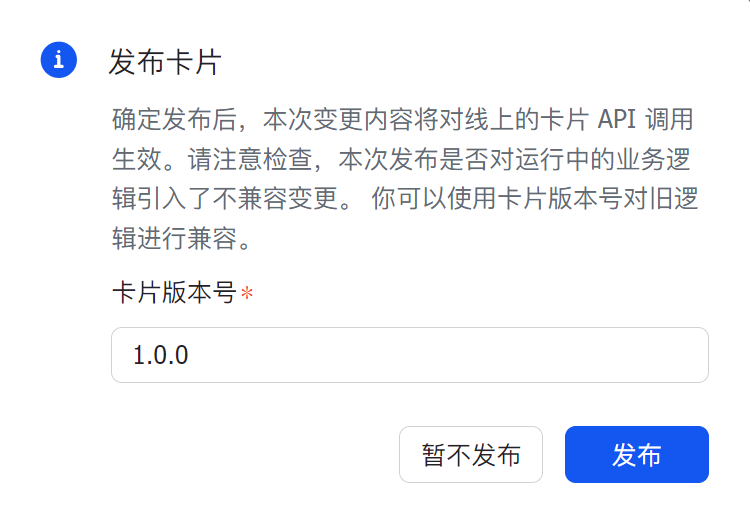
2. 在 **发布卡片** 对话框,设置 **卡片版本号**,并点击 **发布**。首次发布时版本号一般设置为 `1.0.0`。
3. 发布卡片后,你可参考[发送由搭建工具构建的卡片](https://open.feishu.cn/document/uAjLw4CM/ukzMukzMukzM/feishu-cards/send-feishu-card)调用 API 发送卡片。
卡片发布后,将对线上的卡片相关的 API 调用立即生效。你需确认本次发布是否会对服务端代码逻辑产生不兼容变更。为避免此类情况,在请求发送卡片时,你可将 `template_version_name` 参数设置为固定的卡片版本号,避免在工具上发布卡片后立即影响线上业务逻辑。
200381 | Failed to create card content, ext=ErrCode: 200381; ErrMsg: template is not visible to app, please confirm whether the app is allowed to use this template; ErrorValue: %v, templateID: %v | 无卡片使用权限。请检查当前发送卡片的应用或自定义机器人是否具有该卡片的使用权限,参考[管理卡片模板权限](https://open.feishu.cn/document/uAjLw4CM/ukzMukzMukzM/feishu-cards/feishu-card-cardkit/manage-card-template#4530c6a7)。
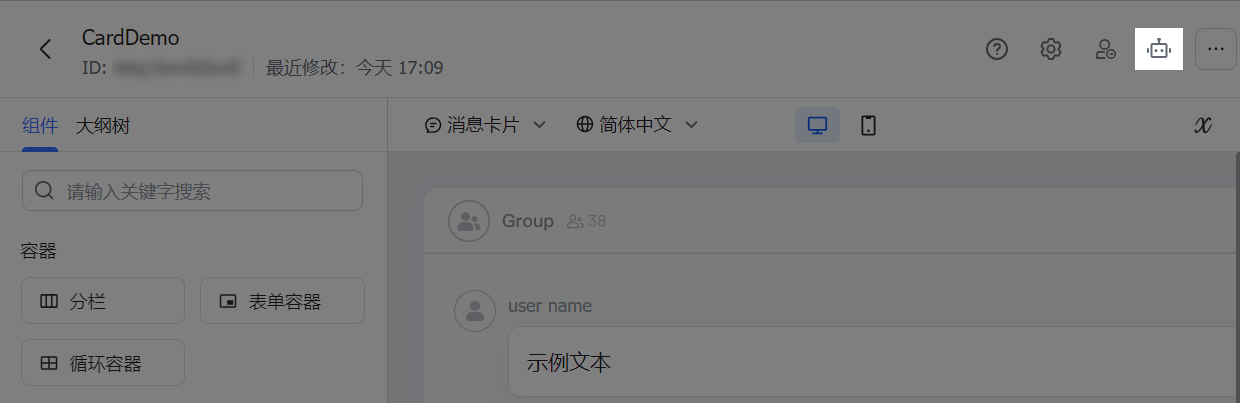
1. 在卡片模板的编辑页面,点击应用图标。
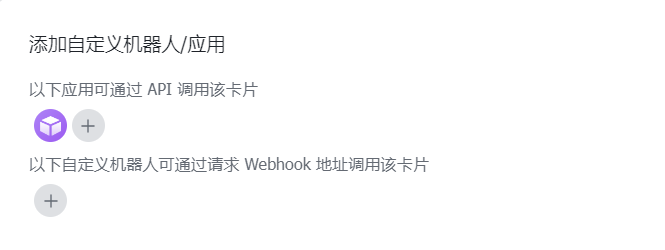
2. 在 **添加自定义机器人/应用** 弹窗中,添加应用或自定义机器人,使该应用或自定义机器人拥有调用该卡片模板的权限。
200621 | Failed to create card content, ext=ErrCode: 200621; ErrMsg: parse card json err, please check whether the card json is correct; ErrorValue: %v | 卡片 JSON 格式错误。请参考[卡片 JSON 代码结构](https://open.feishu.cn/document/uAjLw4CM/ukzMukzMukzM/feishu-cards/card-json-structure)检查卡片内容。
200732 | Failed to create card content, ext=ErrCode: 200732; ErrMsg: the actual type of the variable is inconsistent with the specified type in the template. Please check the type of the variable; ErrorValue: %v, specifiedType: %v, actualType: %v | 卡片变量类型错误。请检查发送模版卡片时使用的变量的数据类型与构造该模版时指定的变量数据类型是否一致。对于新版卡片(JSON 2.0 结构),建议你将 errMsg 错误信息发送给[智能助手](https://open.feishu.cn/search?from=header&page=1&pageSize=10&q=Failed+to+create+card+content%2C+ext%3DErrCode%3A+200732%3B+ErrMsg%3A+the+actual+type+of+the+variable+is+inconsistent+with+the+expected+type+in+the+template.+please+check+the+type+of+the+variable%3B+ErrorValue%3A+varName%3A+text_var_1%2C+expectType%3A+string%2C+actualType%3A+bool%3B&topicFilter=),针对具体错误变量,获得针对性的建议。
200737 | Failed to create card content, ext=ErrCode: 200737; ErrMsg: the format of the variable is incorrect. Please check the format of the variable; ErrorValue: %v, specifiedFormat: %v, actualFormat: %v | 卡片变量格式错误。建议你将 errMsg 错误信息发送给[智能助手](https://open.feishu.cn/search?from=header&page=1&pageSize=10&q=Failed+to+create+card+content%2C+ext%3DErrCode%3A+200737%3B+ErrMsg%3A+the+format+of+the+variable+is+incorrect.+please+check+the+format+of+the+variable%3B+ErrorValue%3A+varName%3A+text_var_1%2C+specifiedFormat%3A+yyyy-MM-dd%2C+actualFormat%3A+yyyy&topicFilter=),针对具体错误变量,获得针对性的建议。
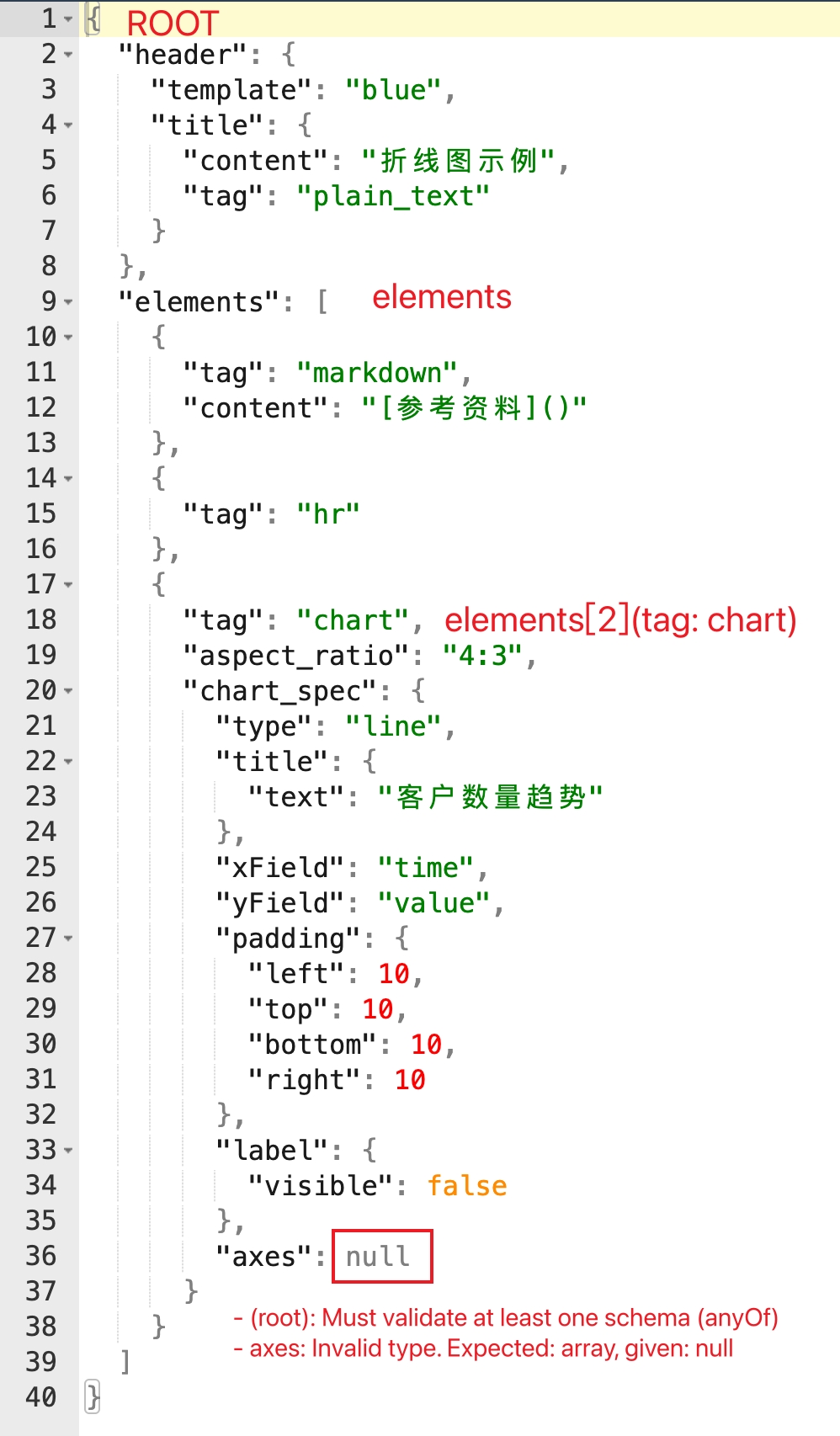
200550 | Failed to create card content, ext=ErrCode: 200550; ErrPath: ROOT -> elements -> %v; ErrMsg: chart spec is invalid; ErrorValue: %v | 卡片中的图表组件配置错误。请检查图表组件中的 chart_spec 属性配置是否正确,参考[图表](https://open.feishu.cn/document/uAjLw4CM/ukzMukzMukzM/feishu-cards/card-components/content-components/chart#39ee4e65)组件。
```json
{
"code": 230099,
"msg": "Failed to create card content, ext=ErrCode: 200550; ErrPath: ROOT -> elements -> [2](tag: chart); ErrMsg: chart spec is invalid; ErrorValue: - (root): Must validate at least one schema (anyOf)\n- axes: Invalid type. Expected: array, given: null\n; ",
"error": {
"log_id": "202409131613579778D691D6E05516DE2D",
"troubleshooter": "排查建议查看(Troubleshooting suggestions): https://open.feishu.cn/search?from=openapi&log_id=202409131613579778D691D6E05516DE2D&code=230099&method_id=6921911482032898068"
}
}
```
ErrPath 示例说明: ROOT -> elements -> [2](tag: chart)
200861 | Failed to create card content, ext=ErrCode: 200861; ErrPath: ROOT -> body -> elements -> %v; ErrMsg: cards of schema V2 no longer support this capability; ErrorValue: unsupported tag %v | 卡片中使用了schema 1 支持但 schema 2 不再支持的组件。请检查卡片内容,移除或替换不支持的标签,参考 [废弃组件说明文档](https://open.feishu.cn/document/uAjLw4CM/ukzMukzMukzM/feishu-cards/card-json-v2-breaking-changes-release-notes#47cd6626)。
200570 | Failed to create card content, ext=ErrCode: 200570; ErrMsg: card contains invalid image keys; ErrorValue: image key %v | 卡片中的图片资源无效。请检查卡片中是否使用了正确的 img_key,你可以调用[上传图片](https://open.feishu.cn/document/uAjLw4CM/ukTMukTMukTM/reference/im-v1/image/create)接口或在搭建工具中上传图片,获取图片的 key。
200914 | table rows is invalid | 表格行无效。可能原因与排查方案:
- 表格的 rows 部分不是一个合法的 JSON,示例参考[表格 JSON 结构](https://open.feishu.cn/document/uAjLw4CM/ukzMukzMukzM/feishu-cards/card-components/content-components/table#51c332ce)。
- 单元格数据类型解析错误。例如,某列的单元格类型是富文本,但该列该行的数据按富文本解析失败。该场景下可根据返回的单元格行列索引(从 0 开始计数),定位问题单元格,然后参考[表格](https://open.feishu.cn/document/uAjLw4CM/ukzMukzMukzM/feishu-cards/card-components/content-components/table)中的 **data_type 字段说明**,检查是否配置有误。
200915 | table rows name is invalid | 表格的行名称没有在列中声明。在卡片的[表格组件](https://open.feishu.cn/document/uAjLw4CM/ukzMukzMukzM/feishu-cards/card-json-v2-components/content-components/table)参数内,`rows` 字段需要以 `"name": VLAUE` 的形式定义每一行的数据内容,其中 `name` 为 `column` 中的 `name`(自定义的列 key),你需要检查 `column` 字段值,确保其中的 `name` 已传入正确值。
300240 | Failed to create card content, ext=ErrCode: 300240; ErrMsg: This application cannot retrieve audio information. Please check if the application used for uploading audio is the same as the one used for sending messages; | 音频组件中音频的 `file_key` 无效。请确保:
- 你已调用[上传文件](https://open.feishu.cn/document/uAjLw4CM/ukTMukTMukTM/reference/im-v1/file/create)接口,获取音频的 `file_key`
- 调用[上传文件](https://open.feishu.cn/document/uAjLw4CM/ukTMukTMukTM/reference/im-v1/file/create)接口的应用与之后发送卡片的应用一致
300230 | Failed to create card content, ext=ErrCode: 300230; ErrMsg: duplicate audio id; | 在同一张卡片内,音频组件的 `audio_id` 字段的值需全局唯一。请检查卡片 JSON 中 `audio_id` 的值是否有重复。
300220 | Failed to create card content, ext=ErrCode: 300220; ErrMsg: audio elem don't support forward; | 包含音频组件的卡片不支持转发。请在卡片 JSON 的 `config` 配置中,指定 `enable_forward` 为 `false`。
其他未列出的错误码请参见[服务端通用错误码](https://open.feishu.cn/document/ukTMukTMukTM/ugjM14COyUjL4ITN)。